External reference clock
How do I know when Moku:Delta, Moku:Pro, or Moku:Lab is using the external reference clock?

Written by Paul Cracknell
Updated at January 13th, 2026
-
Moku:Go
Moku:Go General Moku:Go Arbitrary Waveform Generator Moku:Go Data Logger Moku:Go Digital Filter Box Moku:Go FIR Filter Builder Moku:Go Frequency Response Analyzer Moku:Go Logic Analyzer & Pattern Generator Moku:Go Oscilloscope & Voltmeter Moku:Go PID Controller Moku:Go Spectrum Analyzer Moku:Go Waveform Generator Moku:Go Power Supplies Moku:Go Lock-in Amplifier Moku:Go Time & Frequency Analyzer Moku:Go Laser Lock Box Moku:Go Phasemeter
-
Moku:Lab
Moku:Lab General Moku:Lab Arbitrary Waveform Generator Moku:Lab Data Logger Moku:Lab Digital Filter Box Moku:Lab FIR Filter Builder Moku:Lab Frequency Response Analyzer Moku:Lab Laser Lock Box Moku:Lab Lock-in Amplifier Moku:Lab Oscilloscope Moku:Lab Phasemeter Moku:Lab PID Controller Moku:Lab Spectrum Analyzer Moku:Lab Time & Frequency Analyzer Moku:Lab Waveform Generator Moku:Lab Logic Analyzer/Pattern Generator
-
Moku:Pro
Moku:Pro General Moku:Pro Arbitrary Waveform Generator Moku:Pro Data Logger Moku:Pro Frequency Response Analyzer Moku:Pro Oscilloscope Moku:Pro PID Controller Moku:Pro Spectrum Analyzer Moku:Pro Waveform Generator Moku:Pro Lock-in Amplifier Moku:Pro Laser Lock Box Moku:Pro Digital Filter Box Moku:Pro FIR Filter Builder Moku:Pro Phasemeter Moku:Pro Multi-instrument Mode Moku:Pro Logic Analyzer/Pattern Generator Moku:Pro Time & Frequency Analyzer
- Python API
- MATLAB API
- Arbitrary Waveform Generator
- Data Logger
- Digital Filter Box
- FIR Filter Builder
- Frequency Response Analyzer
- Laser Lock Box
- Lock-in Amplifier
- Oscilloscope
- Phasemeter
- PID Controller
- Spectrum Analyzer
- Time & Frequency Analyzer
- Waveform Generator
- Logic Analyzer & Pattern Generator
- Multi Instrument Mode
- Moku Cloud Compile
- Moku general
- LabVIEW
- mokucli
- Moku:Delta
Moku:Delta, Moku:Pro, and Moku:Lab have the ability to supply an external 10 MHz reference clock to other test and measurement devices. It also has an external reference clock input, which allows Moku:Delta, Moku:Pro, or Moku:Lab to lock to an external 10 MHz reference provided by another Moku or other test and measurement equipment. The reference clock input and output are on the rear panel.
%20(1).png)
Moku:Delta rear panel, reference clock BNC ports
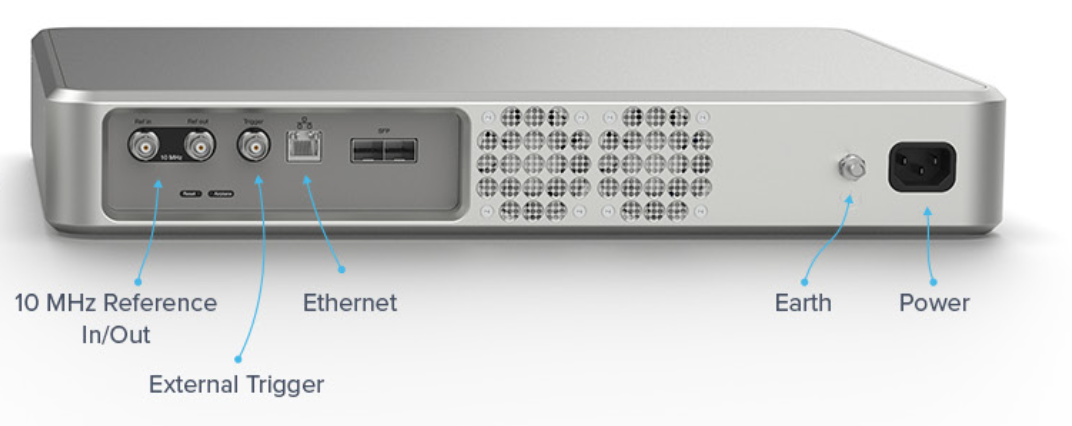
Moku:Pro rear panel, reference clock BNC ports

Moku:Lab rear panel, reference clock BNC ports
In the Moku app, ensure 'Always use internal reference' is disabled. Then, when an external 10 MHz signal is applied to the Moku reference input and the device has locked to it:
The second LED on the front panel of Moku:Delta will be either white or green depending on whether or not GPS is active.

On Moku:Pro, the third LED on the front panel will be blue.

More information on the front panel status LEDs can be found in the Quick Start Guide for Moku:Pro and Moku:Delta.