How to hard reset Moku:Go and Moku:Lab when they cannot boot?

Written by Le Wang
Updated at December 23rd, 2025
-
Moku:Go
Moku:Go General Moku:Go Arbitrary Waveform Generator Moku:Go Data Logger Moku:Go Digital Filter Box Moku:Go FIR Filter Builder Moku:Go Frequency Response Analyzer Moku:Go Logic Analyzer & Pattern Generator Moku:Go Oscilloscope & Voltmeter Moku:Go PID Controller Moku:Go Spectrum Analyzer Moku:Go Waveform Generator Moku:Go Power Supplies Moku:Go Lock-in Amplifier Moku:Go Time & Frequency Analyzer Moku:Go Laser Lock Box Moku:Go Phasemeter
-
Moku:Lab
Moku:Lab General Moku:Lab Arbitrary Waveform Generator Moku:Lab Data Logger Moku:Lab Digital Filter Box Moku:Lab FIR Filter Builder Moku:Lab Frequency Response Analyzer Moku:Lab Laser Lock Box Moku:Lab Lock-in Amplifier Moku:Lab Oscilloscope Moku:Lab Phasemeter Moku:Lab PID Controller Moku:Lab Spectrum Analyzer Moku:Lab Time & Frequency Analyzer Moku:Lab Waveform Generator Moku:Lab Logic Analyzer/Pattern Generator
-
Moku:Pro
Moku:Pro General Moku:Pro Arbitrary Waveform Generator Moku:Pro Data Logger Moku:Pro Frequency Response Analyzer Moku:Pro Oscilloscope Moku:Pro PID Controller Moku:Pro Spectrum Analyzer Moku:Pro Waveform Generator Moku:Pro Lock-in Amplifier Moku:Pro Laser Lock Box Moku:Pro Digital Filter Box Moku:Pro FIR Filter Builder Moku:Pro Phasemeter Moku:Pro Multi-instrument Mode Moku:Pro Logic Analyzer/Pattern Generator Moku:Pro Time & Frequency Analyzer
- Python API
- MATLAB API
- Arbitrary Waveform Generator
- Data Logger
- Digital Filter Box
- FIR Filter Builder
- Frequency Response Analyzer
- Laser Lock Box
- Lock-in Amplifier
- Oscilloscope
- Phasemeter
- PID Controller
- Spectrum Analyzer
- Time & Frequency Analyzer
- Waveform Generator
- Logic Analyzer & Pattern Generator
- Multi Instrument Mode
- Moku Cloud Compile
- Moku general
- LabVIEW
- mokucli
- Moku:Delta
If your Moku:Go or Moku:Lab device fails to boot, such as after an unsuccessful firmware update, a hard reset is recommended. One sign of this issue is if the status LED remains solid orange for several minutes after powering on.
Steps for a hard reset on Moku:Go:
- Disconnect the power from the Moku:Go.
- Depress and hold the Factory Reset button with a paperclip. The reset button is on the bottom side of the device.
- Connect power while holding the Factory Reset button. The status LED will light up orange as the device powers on. (Please don't release the Reset button yet.)
- Keep holding the Reset button for a few more seconds until the orange LED starts blinking. The blinking could last over 2 min before the orange light turns off.
- After the light is off, disconnect and reconnect power to reboot Moku.
- This process might need to be performed more than once to see LED off finally.
Steps for a hard reset on Moku:Lab:
- Unplug the power cable to power off your Moku:Lab. Then, plug in the power cable and use a paperclip or small object to press and hold the reset button on the underside of your Moku:Lab.
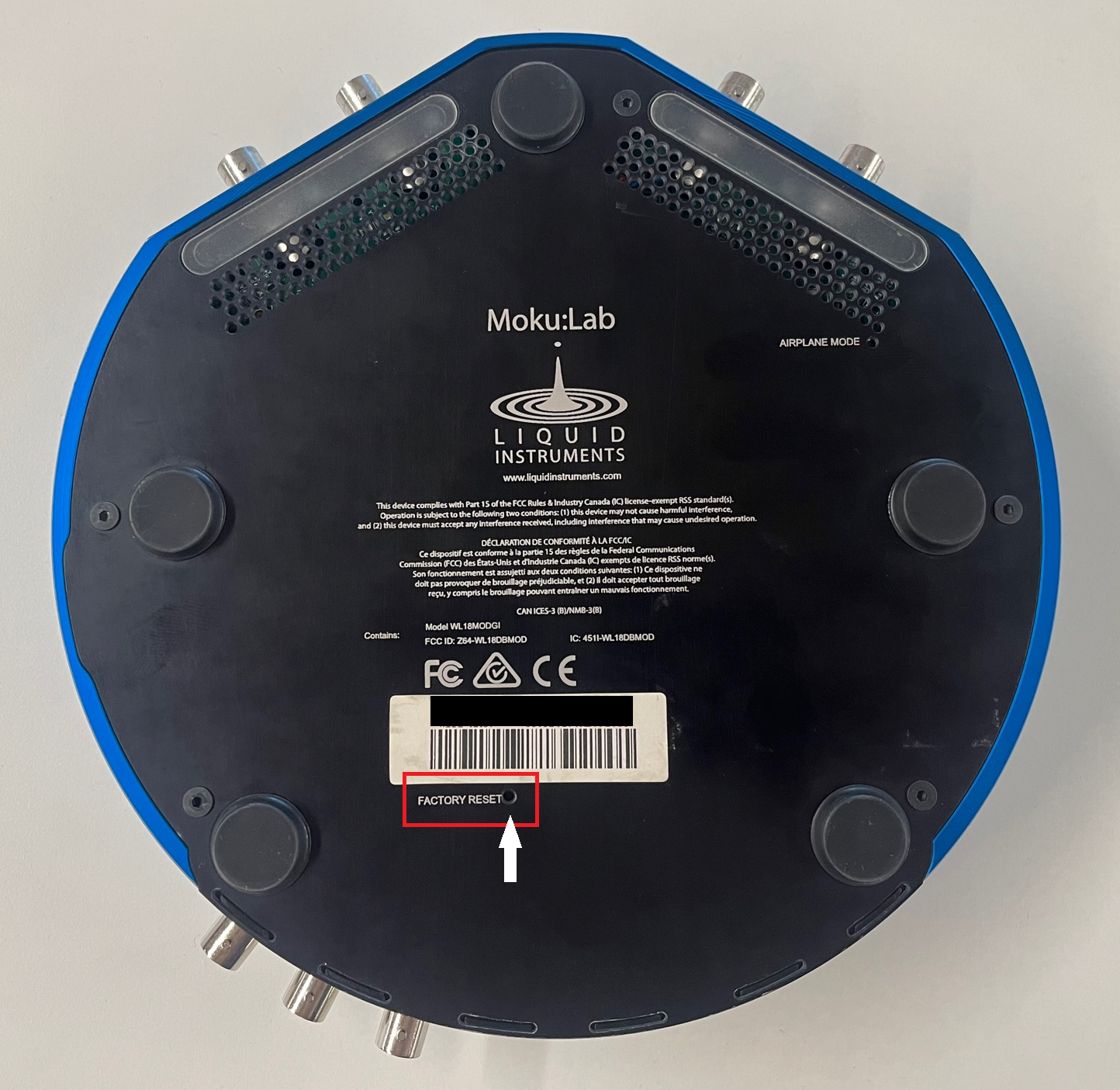
- While continuing to hold the reset button, power on the Moku:Lab by pressing and holding the front power button for two seconds. Continue to hold down the reset button even after it powers on.
- The status LEDs on the power button will cycle through different colors as your Moku:Lab re-initializes while holding down the button:
- Orange for about 30 seconds
- Flashing orange and white for about 2 seconds
- Orange for another 30 to 40 seconds
- A subtle “click” will sound, indicating that you may release the reset button
- Orange and blue lights will eventually appear and the device will restart on its own

- Wait for the Moku:Lab to finish booting back up. The Moku:Lab will restart in Wireless Access Point mode with Ethernet enabled.